


 Back
Back

You've won! Now what?
Firstly, congratulations on your win! Now how to cash out your winnings? There are a few steps that you need to take to verify your identity and account details. This is known as 'KYC' (Know Your Customer), You should only have to do this once. Any future withdrawals will not require these steps. Here is what is required:*
*Please note that we will not process a withdrawal request to an account that has no deposit history. If you have won money from a free bonus, you will need to make a deposit and wager that deposit a minimum of 1X in order for your withdrawal to be considered. Your withdrawal will be subject to the terms of the free bonus that was the source of the winnings. Any winnings from the deposit can be added to the total.
Now, on to the withdrawal process:
Step 1: Make the request:
Click on the WITHDRAW button at the top of the screen. This opens the cashier and will show you a list of the withdrawal methods that are available to you at this time. Please check the banking page to determine which method is most appropriate for your needs.
Choose the AMOUNT you would like to receive and the METHOD required (You will need to ensure that all details are correct, such as your bank account, your mailing address or your bitcoin account number, whichever is appropriate)
Step 2: Verify your identity:
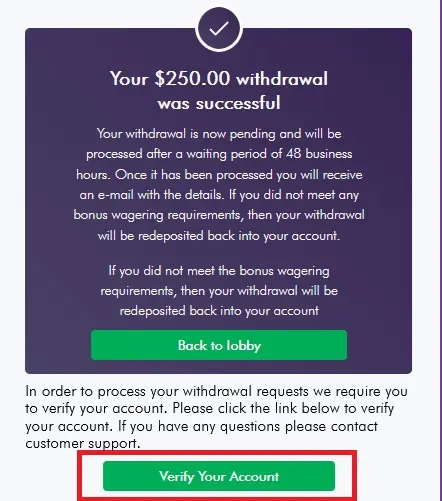
Once you've successfully made the request, as shown above, you will immediately receive an email with an account verification link, which is valid for seven days to allow you to upload the information required, or you can click on the VERIFY YOUR ACCOUNT link in the cashier as shown.
Step 3: Get your documentation prepared:
You will need the following:
1: An identity document that proves who you are. Any one of the following is accepted:
- Valid Drivers License
- ID Card
- Residence Permit
- Valid Passport
2: A document that shows proof of address. Any one of the following is accepted:
- ID with address details
- Bank statement, (Must be within the last three months and show partial transaction history).
- Utility Bill (Must have the address visible and be within the last three months)
- Government issued documentation (Must be current, within the last three months).
3: A self-portrait: You may use your camera phone.
IMPORTANT TIPS:
To avoid unnecessary additional requests, please ensure you follow these guidelines when submitting your account verification:
DO:
- Ensure all four corners of the document are visible
- Ensure text is sharp and easy to read
- Ensure good lighting, no shadows or glare
- Upload a color photo (not black and white)
DON"T:
- Upload documents that are blurry, or out of focus
- Upload documents with the edges or corners cut off
- Upload documents that are too dark or washed out by flash
- Upload documents where the name doesn't match the one on your account
Step 4: Follow the verification process:
1: You will enter your first and last name
2: You will select your country of residence and the type of ID you are providing
3: You will scan and upload your ID document
4: You will upload your proof of address document
The final step is a quick selfie to confirm you're a real person. Tips:
Find a well-lit spot, keep your face in the frame, remove any hats, glasses, or masks. Position your face in the frame and follow the prompts.
That's it, you're done
Back to home